Skip to content
SentioCX

Product

ExpertLoop™

An operational routing layer for customer service that sits on top of your existing platform — Salesforce or CCaaS. Pairing, prioritization, active SLA management, automated traffic shaping, and dual-track AI operation: continuously adaptive, driven by business impact.

Where it sits

The escalation infrastructure between your AI agents and your human experts

Demand signals flow in; governed execution flows out. ExpertLoop™ is the decisioning layer in between — real-time and bi-directional, with your platform executing every assignment.

DEMAND — SIGNALS INSUPPLY — EXECUTION OUTYour AI agentsIntentContextSentimentData Cloud / CRMCustomer valueChurn riskCompliance sensitivityHuman AccessDecisioning LayerReal-time · bi-directionalAdaptive impact scoringValue, risk, urgency — weighted livePrecision matchingIntent × skill × proficiency × authorizationContinuous decisioningRe-evaluated as the case evolvesCapacity governanceProtects scarce expertise under loadYour platformReal-time routing instructionsand predicted wait timeHuman expertsspecialistsFallbacksCallbacks · Self-serviceA continuous feedback loop refines matching and SLA attainment over time

These signals continuously update what each handoff is worth, how urgent it is, and what expertise it requires.

What ExpertLoop™ adds

Right order. Right expert. Right moment.

Your AI agent decides when a human is needed. ExpertLoop™ governs what happens next — and records every decision with a full auditable trail.

Right order

Prioritize by business impact

A Business Impact Score ranks every handoff by business value across weighted dimensions — not static priority tiers. Weights adjust as conditions change.

Right expert

Match the best-fit specialist

Matches on intent, skills, proficiency, and authorization — the authorized human expert most likely to resolve it, not just the next available one.

Right moment

Keep the decision current

Predicted wait updates while the customer waits. When sentiment, intent, or SLA pressure shifts, ExpertLoop™ reprioritizes automatically or offers alternatives.

How it works

Six mechanisms, one continuously optimized operation

Built on attribute-based routing foundations, extended with proprietary capabilities that drive customer affinity, business outcomes, and operational excellence.

Intent-based routing

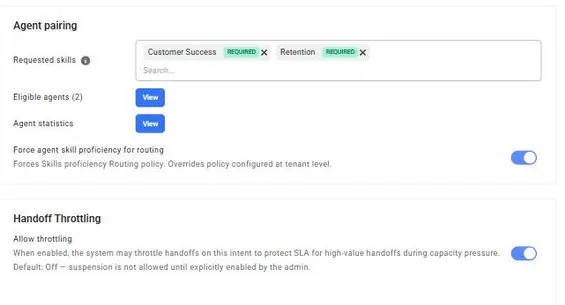
Operations are organized around customer intent — the specific reason the customer needs help. Each intent carries the skills, proficiency levels, priority, and sentiment settings that drive pairing and prioritization end to end.
Business-impact prioritization

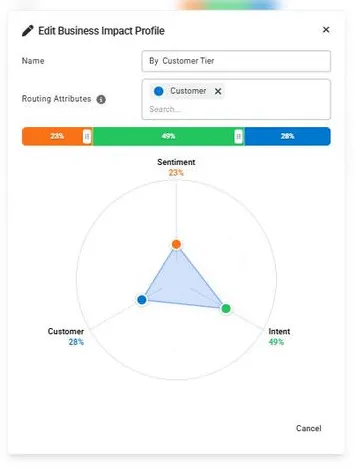
You define what is valuable; ExpertLoop™ prioritizes accordingly. Every handoff gets its own business impact score — a weighted combination of intent priority, customer sentiment, customer value from your CRM, and your own routing attributes — re-evaluated continuously, with every decision logged, explainable, and auditable.

Active SLA management

Your SLA drives routing instead of just measuring it. ExpertLoop™ tracks every handoff’s progress toward its target and adjusts priority and pairing criteria to attain it — no dashboard firefighting.

Automated traffic shaping

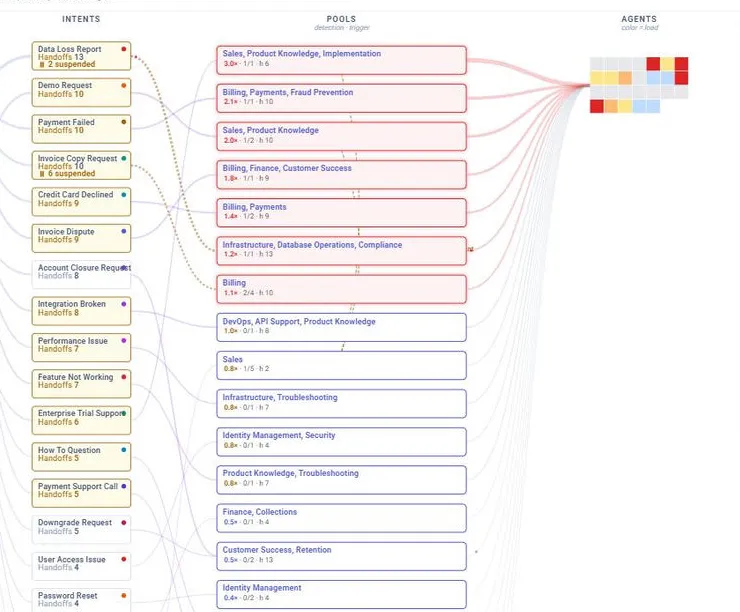
During congestion, expert capacity is automatically preserved for the most important work. Lower-value handoffs are deferred with alternatives — callback, self-service, channel switch — and resume automatically when conditions improve.

Dual-track AI operation

When an AI agent needs a human, it triggers ExpertLoop™ and keeps serving the customer while the search runs in parallel. The AI agent can update routing criteria in real time as the conversation evolves.

Attribute-based pairing

An evolution of skills-based routing: each handoff is matched on intent, skills, proficiency, and authorization — the right authorized human expert, not a binary skill tag.

+60%

first-time resolution through intent-level pairing

−76%

supervisor intervention, while driving business impact

100%

configuration, not code — run by your own admins

In operation

See ExpertLoop™ at work

Configured and steered by your own team — intents, business impact profiles, and live routing insight.

ExpertLoop™ agent pairing on an intent: required skills with enforced proficiency, eligible agents, and handoff throttling
Agent pairing on an intent — required skills, enforced proficiency, and traffic shaping.
ExpertLoop™ traffic topology: intents flowing into expert pools and agents, with congested pools highlighted
Traffic topology — intents flowing into expert pools, congestion made visible.
Business impact profile editor weighting sentiment, intent, and customer dimensions
Business impact profiles — you define what matters; routing acts on it.

The flow

From customer contact to the right expert

  1. Context arrives

    Your AI agent — or any self-service layer — identifies intent and sentiment; your CRM contributes customer value, churn risk, and history.

  2. ExpertLoop™ decides

    Every handoff is scored for business impact, ranked in one pool, and paired with the best available human expert — continuously re-evaluated while it waits.

  3. Your platform executes

    The routing decision returns to your contact center platform, which assigns the work. Media, desktop, and reporting stay exactly where they are.

See ExpertLoop™ on your own Salesforce org

Install from the AppExchange and run it with configuration, not code — or talk to us about your routing operation.